Dendrobium: A Presentation Template for Every Story
Imagine you have a brilliant idea, a quarterly report that needs to impress, or a school project that demands attention. You open a blank slide deck, and the cursor blinks back at you, mocking the empty canvas. We’ve all been there. The gap between a great concept and a polished, professional presentation can feel vast, filled with hours of aligning text boxes, sourcing images, and wrestling with color palettes. This is precisely the kind of friction the Dendrobium template was designed to eliminate, offering a structured yet flexible foundation for your visual narrative.
More Than Just Slides: A Framework for Clarity
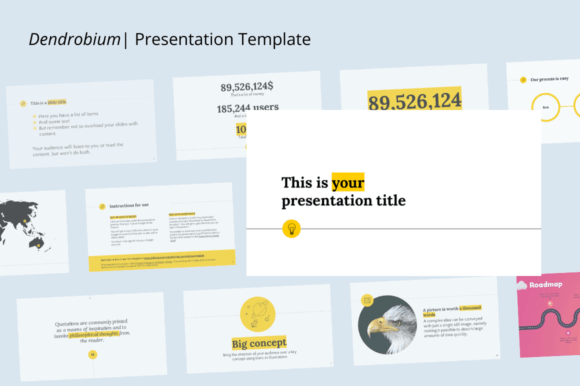
Dendrobium isn't a collection of pretty backgrounds. It's a thoughtful framework. With 31 slides built on a 16:9 ratio, it provides a logical flow for diverse needs, from a corporate pitch to a creative portfolio review. The true value lies in its editable nature. Every shape, chart, and text element is customizable, which means you’re not just filling in blanks—you’re tailoring a communication tool to your specific message. This adaptability is key for maintaining visual consistency across your brand or project, ensuring that from the first slide to the last, your presentation feels cohesive and intentional.
For a small business owner, this could mean developing a consistent brand identity across all client-facing materials. The same color scheme and typography used in your Dendrobium presentation can inform your website, social media graphics, and even packaging design. For an educator or student, it transforms a report from a simple document into an engaging visual story, improving audience engagement and making complex information digestible. The drag-and-drop functionality and one-click image insertion remove technical barriers, allowing you to focus on your content and its delivery.
Practical Applications for Real-World Projects
Let’s move beyond theory. Where does a template like Dendrobium genuinely save time and elevate quality? Consider these scenarios:
- Client Pitches & Proposals: Use the portfolio and company profile slides to showcase your work, team, and process. The clean layout helps in logo design presentations or branding strategy reveals, where visual clarity is paramount.
- Marketing & Sales: Build compelling marketing assets. The included charts are perfect for displaying data from a campaign, while the modern typography ensures your key messages about a new product or service are readable and impactful.
- Internal Communications: Create training materials, project updates, or all-hands meeting decks that are easy to follow. The professional presentation style boosts credibility and keeps your team focused.
- Creative & Educational Projects: Photographers can use it for client lookbooks. Teachers can build interactive lesson plans. The versatility supports everything from editorial layouts to simple storyboarding.
The included icon vector and documentation file are practical bonuses, offering quick visual aids and guidance to get you started without a steep learning curve.
Integrating Dendrobium into Your Design Toolkit
A powerful template functions best as part of a broader design ecosystem. Think of Dendrobium as a starting point for your visual language. When selecting your color scheme within the template, choose hues that reflect your brand’s personality or the project’s mood. Are you aiming for trustworthy and calm, or energetic and innovative? These choices directly influence brand recognition.
Typography within the template is equally crucial. While the template has its own style, consider how you can pair it with other design assets. For instance, if your main brand uses a particular serif font for headings, you might adapt the Dendrobium text styles to align with that, creating a seamless transition between your presentation and other materials like your website or print materials. Always test how your chosen fonts look on different screens and when printed, prioritizing readability above all else. A beautiful display font for a title may not work for body text.
Remember, the goal is not to use every feature the template offers, but to use the features that serve your communication objective. A social media manager might primarily use the slides designed for visual portfolios, while a financial consultant would leverage the data visualization charts. This selective, purpose-driven approach ensures your final presentation is focused, professional, and genuinely helpful for your audience. In a world saturated with information, a clear, well-designed visual narrative isn’t just nice to have—it’s an essential tool for connection and clarity.