Master Your Month: A Customizable Canva Review Template
There’s a specific kind of clarity that comes from looking back at a month that’s just ended. Not just glancing at a calendar, but really digging into what worked, what didn’t, and where the energy went. For busy entrepreneurs, creators, and coaches, this monthly reflection isn’t just a nice-to-have; it’s the engine for smarter planning and sustainable growth. Yet, the process can often feel disjointed—scribbled notes, scattered digital files, or a generic planner that doesn’t quite fit the unique rhythm of your business. This is where a thoughtfully designed system steps in, transforming a chore into a powerful, brand-building ritual.
Beyond a Blank Page: Your Brand's Visual Ally
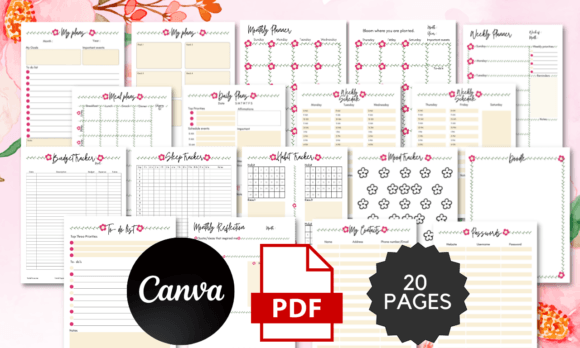
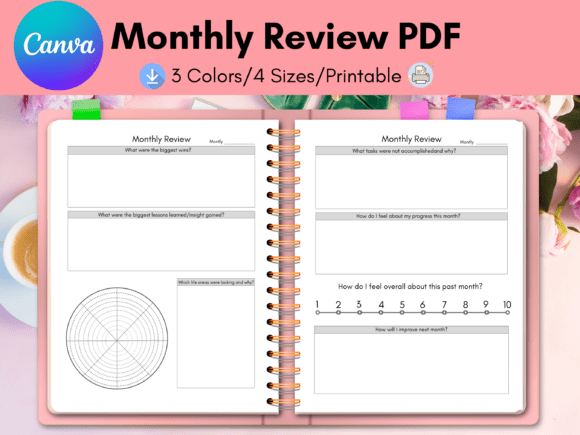
Imagine a monthly review process that feels less like accounting and more like a strategic conversation with your business. The Monthly Review Canva template is built to facilitate exactly that. It’s a two-page digital canvas designed for clarity and customization. The layout is clean and intuitive, providing structured sections for reflection without being rigid. You’ll find dedicated spaces for celebrating wins, analyzing challenges, setting intentions for the month ahead, and tracking key metrics. But its true power lies in its adaptability.
This isn't a one-size-fits-all PDF. It’s a living Canva source file. This means you have complete control to make it an authentic extension of your brand identity. Swap the default color palette with your own brand colors in seconds. Upload your logo and position it perfectly. Choose fonts that match your brand’s voice—whether that’s a clean sans serif for a modern tech feel or a friendly handwritten font for a coaching practice. The design elements, from icons to section dividers, are all fully editable. The result is a professional, cohesive document that looks and feels like it was made specifically for your business, because it was.
Practical Applications Across Your Business
The versatility of this customizable template makes it a valuable asset for a wide range of professionals and projects. For a life or business coach, it becomes a client-ready deliverable. You can design a monthly review sheet for your coaching packages, branded to your practice, that guides clients through their progress in a visually appealing way. A financial coach can use it to create a branded monthly budget review sheet, making number-crunching feel more accessible and aligned with their supportive methodology.
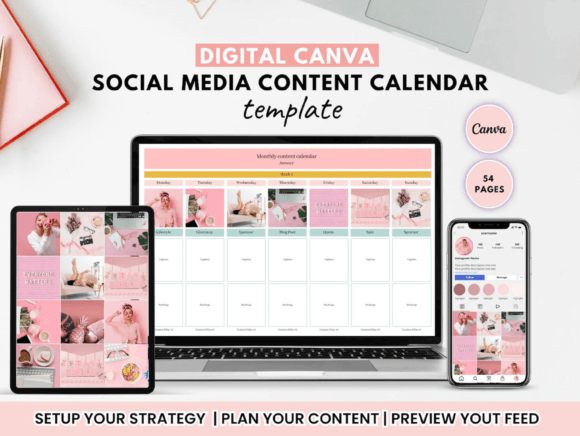
Bloggers and content creators will find it indispensable for content planning. Use the first page to review last month’s analytics, top-performing posts, and audience engagement. The second page can then be used to map out the next month’s content calendar, editorial themes, and social media strategy. For Etsy and Shopify store owners, it’s a game-changer for inventory and sales analysis. Track best-selling products, review marketing campaign results, and plan product launches or sales events for the coming month, all within a beautifully branded document.
The applications extend even further. Use the template as a foundation for creating printable planners or digital products to sell. Design branded marketing assets like monthly progress reports for clients. Create consistent social media graphics by exporting specific sections as quote cards or tip graphics. The included sizes—Letter, A4, A5, and Happy Planner Classic—ensure your final design is ready for digital use or physical printing, whether for your own desk or for sale.
Elevating Your Brand Through Consistent Design
Consistency is the cornerstone of brand recognition. Every touchpoint a client or customer has with your business contributes to their perception of your professionalism and reliability. Using a tool like this Monthly Review template reinforces your brand identity in a subtle yet powerful way. When your internal planning documents, client handouts, and digital products all share the same visual language, it communicates attention to detail and cohesion.
This level of visual consistency directly impacts brand recognition. A follower who sees your branded review template in a behind-the-scenes Instagram story will instantly connect it with your other content. A client who receives a beautifully designed monthly reflection sheet feels the value of your service before even reading a word. The template acts as a design asset that helps you maintain a professional presentation across all facets of your operation, from internal strategy to external communication.
Getting Started and Making It Your Own
Even if you’re new to Canva, the process is straightforward. Canva is a user-friendly, browser-based design platform with a robust free version that offers immense creative freedom. Once you’ve duplicated the template to your Canva account, the customization journey begins. Start with the fundamentals: apply your brand’s primary and secondary colors. Upload your logo and any brand marks. Then, delve into typography. If your brand uses a specific premium font, you can upload it directly to Canva (available with a Pro account or for fonts with proper licensing). If not, explore Canva’s vast library to find a sans serif font, serif font, or script font that resonates with your brand’s personality.
Think about the font pairing you use. A common and effective strategy is to pair a bold, clean display font for headings with a highly readable sans serif for body text. This ensures your document is both visually interesting and easy to scan. Don’t forget to customize the icons. Canva’s library is filled with thousands of line and solid icons. Choose a set that aligns with your aesthetic—minimalist line icons for a modern look, or soft, rounded icons for a friendly feel.
Before finalizing, always do a readability check. Zoom out on your design. Can you quickly identify the different sections? Is the hierarchy of information clear? Test the color contrast between text and background to ensure it’s accessible. Finally, consider the licensing for any elements you use. While Canva’s free elements are great for commercial use, always double-check the license for any uploaded fonts or graphics to ensure they’re cleared for your intended purpose, especially if you plan to sell the final product.
This Monthly Review Canva template is more than just a digital document; it’s a framework for intentional growth. By investing a small amount of time in customizing it to reflect your unique brand, you create a tool that not only organizes your reflections but also actively strengthens your business’s visual identity with every use. It turns a monthly practice into a branded experience, reinforcing who you are and where you’re headed.