Present Your Wall Calendar Design Like a Pro
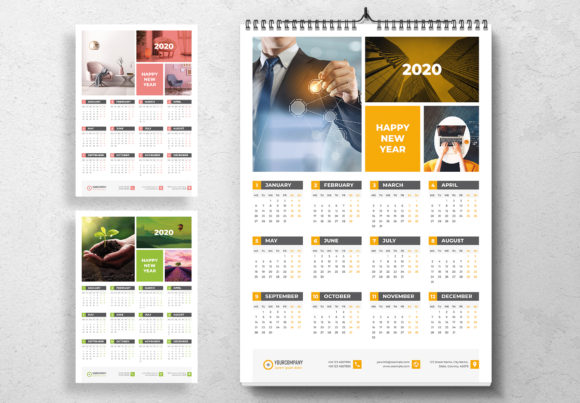
You’ve poured hours into designing a beautiful wall calendar. The photography is stunning, the layout is clean, and the dates are perfectly aligned. But how do you show it to a client or your audience without it looking like a flat, lifeless file on a screen? That’s where a smart presentation tool changes the game. Instead of just sharing a digital image, you can place your design into a realistic scene—a stylish office, a cozy home studio, or a modern kitchen wall. This is the power of a well-crafted mockup template.
What Exactly Is This Design Asset?
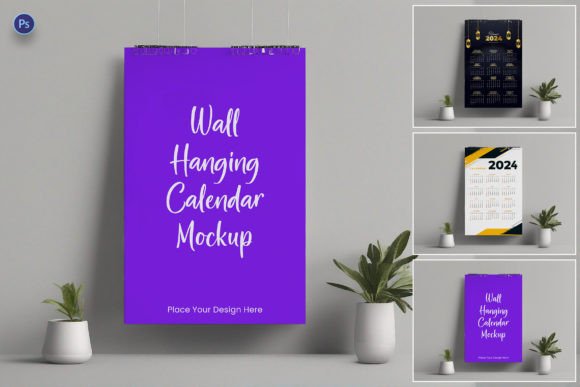
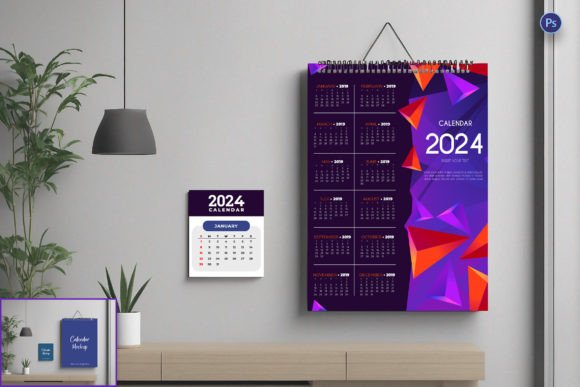
A Hanging Calendar Mockup PSD Template is a pre-built digital scene, typically a Photoshop file, designed to showcase a wall calendar in a lifelike setting. Think of it as a photorealistic stage for your artwork. The template includes layers for the calendar pages, the wall, shadows, lighting, and often other environmental details like a desk, a plant, or a window. You simply insert your own calendar design into the designated smart object layer, and the template automatically applies realistic textures, perspective, and lighting effects. The result? A professional-grade presentation that looks like a photograph of a finished product.
This isn't just about making things look pretty. It's a critical tool for visual communication. A mockup helps clients and customers instantly understand the scale, context, and real-world appeal of your design. It bridges the gap between a digital concept and a tangible product, which is invaluable for brand identity and marketing.
Practical Uses Beyond Simple Presentation
The applications for a high-quality mockup extend far beyond client presentations. For a graphic designer or small business owner, it's a versatile asset for multiple marketing channels.
- E-commerce and Portfolio: Use the mockup images on your website or online store to sell the calendar. It gives potential buyers a clear idea of what they’re purchasing, boosting confidence and conversion rates.
- Social Media Marketing: Create engaging posts for Instagram, Pinterest, or Facebook. A photo-realistic calendar mockup is far more scroll-stopping than a plain design file. It’s perfect for announcements, holiday promotions, or showcasing a new product line.
- Brand and Style Guides: Incorporate the mockup into brand guidelines to show how branded materials (like a company calendar) should look in an office environment. This reinforces brand recognition and consistency.
- Blog and Editorial Content: If you’re a blogger writing about home organization, office decor, or gift guides, a mockup allows you to illustrate your points beautifully without needing to print and photograph a physical calendar.
- Advertising and Print Materials: The high-resolution output is suitable for digital ads, email newsletters, and even print catalogs or lookbooks, ensuring your marketing assets always look polished.
Maximizing Visual Impact and Brand Consistency
The right mockup does more than just display; it enhances your design. The realistic lighting and shadows add depth, making your calendar artwork pop. This level of professional presentation immediately elevates the perceived value of your product. When your mockup consistently uses the same style, angle, and environment across all platforms, it strengthens your brand identity. Customers begin to recognize your aesthetic, whether they see your work on Instagram or in an online store.
Furthermore, it allows you to test how your design interacts with different environments. Does your bold, modern calendar look good against a rustic brick wall? Does your minimalist design hold up in a busy, colorful room? A good template lets you experiment with these scenarios, ensuring your final product is versatile and appealing to your target audience.
Choosing and Using Your Template Effectively
Not all mockup templates are created equal. When selecting one, consider the following practical advice:
- Match the Style to Your Audience: Choose a mockup scene that resonates with your target market. A template featuring a sleek, modern apartment is perfect for a contemporary design brand, while a cozy home office setting might appeal to a family-oriented audience. The environment tells a story.
- Prioritize Editability: Look for a template with well-organized layers and clear instructions. The best ones use Photoshop Smart Objects, allowing you to insert your design with a simple double-click and paste. This saves immense time and frustration.
- Check Resolution and Quality: Ensure the template is high-resolution. Low-quality mockups with blurry textures or poor lighting will undermine your design, no matter how good it is. A premium font or design deserves a premium presentation.
- Understand Licensing: Always verify the commercial license. If you plan to use the final mockup images to sell products or for client work, you need a template that permits commercial use. This is a crucial step to avoid legal issues down the line.
- Test with Real Content: Before committing, try placing a sample of your actual calendar design into the mockup. Check for readability—can the dates and text be seen clearly? Does the overall composition feel balanced? This practical test is more valuable than any marketing description.
Ultimately, a Hanging Calendar Mockup PSD Template is more than just a fancy picture frame. It’s a strategic tool for designers, marketers, and entrepreneurs. It transforms your static designs into compelling stories, builds brand credibility, and provides the versatile, high-quality visuals needed to stand out in a crowded market. By choosing the right template and using it thoughtfully, you ensure your calendar design makes the powerful first impression it deserves.