Streamline Your Workflow: 50 Essential Design Icons
There is a specific kind of frustration that hits when you are deep into a project and realize you are missing a crucial visual asset. You are building a presentation for a client, mocking up a landing page for a new tech product, or designing a tutorial on how to use Adobe Creative Cloud, and suddenly you need a recognizable symbol for "programming," "vector graphics," or "hardware." Scouring the internet for free icons often leads to a mishmash of styles, inconsistent line weights, and licensing headaches. This is exactly the problem that the 50 Design Icons set was built to solve. It is not just a random collection of shapes; it is a curated visual vocabulary tailored for the tech and creative industries.
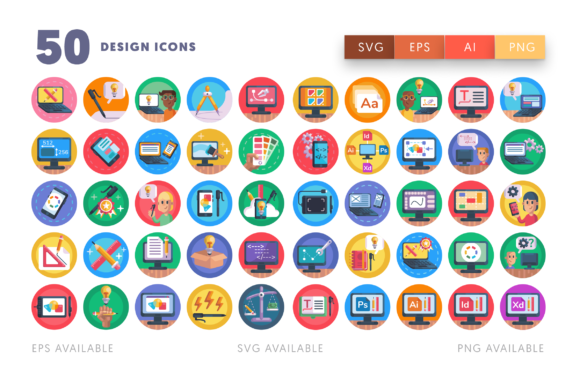
What makes this collection immediately valuable is its specificity. We are not talking about generic symbols here. The set includes highly recognizable representations of the tools we actually use. If you are writing a blog post about switching from a desktop to a laptop, you have the hardware covered. If you are creating a "What's on my desk" flat lay for Instagram, the iPhone, drawing tablet, and drawing pen icons are ready to go. For the software side of things, the inclusion of specific Adobe suite representations—like Adobe Photoshop, Adobe Illustrator, Adobe InDesign, and Adobe Premier Pro—means you can visually explain complex workflows without using copyrighted logos, which can be a legal minefield for commercial projects.
Visualizing the Creative Toolkit
The strength of a good icon set lies in its ability to communicate instantly. When you see the icon for HTML coding or programming, the viewer understands the concept of development immediately. This is vital for modern web design and digital product creation. Imagine you are a freelancer creating a PDF guide on "How to Launch Your Website." Instead of using walls of text to explain the process, you can use these icons to create a visual roadmap. The coding icon represents the build phase, the color wheel represents the design phase, and the desktop computer represents the final launch. It transforms abstract concepts into tangible steps.
For those working in editorial design or packaging design, the utility of assets like the ruler, pencil, and color pallets cannot be overstated. These are the symbols of craftsmanship. If you are designing the packaging for a new line of art supplies, incorporating these vectors adds a layer of authenticity and professionalism. They signal to the customer that the brand understands the creative process. Similarly, for a software company, using the computer settings or user experience icons in a user interface helps guide users through technical menus with friendly, approachable graphics rather than cold, hard text.
Technical Versatility for Any Project
One of the most practical aspects of this package is the file delivery. In a real-world workflow, flexibility is king. You might start a design in Adobe Illustrator for a high-end print job, but need to move it to Sketch or Inkscape for a web prototype, and finally hand off PNG files to a client who just needs to drop them into PowerPoint. This set includes 1 Ai file, 1 EPS file, and 1 SVG file for the master collection, alongside 50 separate files for each format. This means you can grab just the iPhone mockup or the Mac Book icon without opening the massive master file, saving valuable time during a tight deadline.
The scalability of these vectors is a massive advantage for brand identity work. Because the source files are vector-based, you can scale the fonts icon or the color wheel from the size of a favicon to the side of a billboard without losing quality. For merchandise design—think t-shirts, tote bags, or mugs for a design agency—this crispness is non-negotiable. A pixelated icon on a t-shirt looks amateurish. A crisp vector print looks professional. The fact that they are 512 x 512 px in their rasterized form also makes them perfect for immediate use in social media assets or blog headers without needing to resize constantly.
Practical Applications for Branding and Marketing
Let’s look at how this applies to marketing assets. If you run a small agency, consistency is how you build trust. You can use these icons across your entire ecosystem. The Adobe User Experience icon can be used in your proposal documents, on your website’s service page, and in your email newsletters. When a potential client sees the same high-quality visual language repeated across different touchpoints, it subconsciously reinforces your professional presentation.
Consider the social media graphics landscape. Platforms like Instagram and Pinterest are heavily visual. A text-only post often gets scrolled past. However, a post featuring a stylized laptop mockup or a desktop computer icon instantly grabs attention. You can use the open laptop icon to create a "Work in Progress" story highlight cover, or the Adobe Photoshop icon to label a tutorial Reel. Because the files are easy to customize, you can change the colors to match your specific brand hex codes, ensuring that every graphic feels like it belongs to you.
For small business owners and entrepreneurs who might not have a background in complex vector software, the accessibility of the files is a huge relief. The SVG files are incredibly lightweight and can be easily manipulated in browser-based tools or beginner-friendly software. If you are creating an invitation for a tech networking event or a workshop on learning to code, you can mix and match the programmer and HTML coding icons to create a theme that speaks directly to your audience.
Enhancing Visual Communication
Icons serve a functional purpose beyond just looking pretty; they aid in readability. In long-form content, such as a whitepaper or a detailed blog post, breaking up text with relevant icons helps the reader scan the content and find what they are looking for. If you are listing the services you offer—Logo Design, Web Development, Brand Strategy—placing a relevant icon next to each heading makes the list easier to digest. The pencil for design, the coding icon for development, and the color pallets for branding create a visual hierarchy that guides the eye.
Furthermore, in the realm of UI/UX design, clear iconography is essential for navigation. While this set is versatile enough for print, its roots in digital products make it perfect for app interfaces. Using a standardized set of icons ensures that your interface feels cohesive. You don't want one button to have a thick outline style and another to have a flat fill style. Having a unified set ensures that the fonts icon, the settings icon, and the mockup icons all feel like they belong to the same family.
Ultimately, the value of the 50 Design Icons lies in its ability to bridge the gap between idea and execution. Whether you are a hobbyist designing a personal portfolio or a marketing professional building a global campaign, having a library of high-quality, customizable design assets at your fingertips removes friction from the creative process. It allows you to focus on the message you want to convey, rather than getting bogged down in the technicalities of creating basic shapes from scratch.